|
SOL9 Sample: ADOFieldsApplet
|
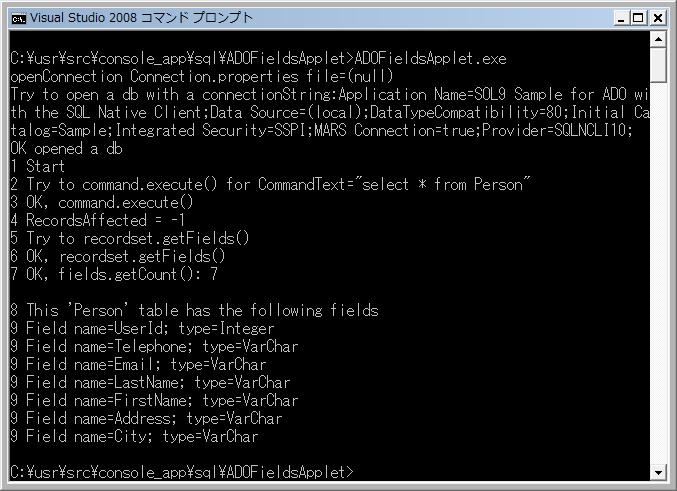
1 Screenshot
2 Source code
/*
 * ADOFieldsApplet.cpp
 * Copyright (c) 2015 Antillia.com TOSHIYUKI ARAI. ALL RIGHTS RESERVED.
 */


// SOL9
// 2009/05/20

// Assumes that environment of SQL Server 2008 and SQLClient1.0
// Please create a database 'Sample' for this example
// and the following table 'Person'
//

#include <sol/sql/ADOApplet.h>


namespace SOL {

class ADOFieldsApplet: public ADOApplet {

public:
  /**
   * Constructor
   */
  ADOFieldsApplet(int argc, const TCHAR** argv)
    :ADOApplet(argc, argv)
  {
  }

public:
  ~ADOFieldsApplet()
  {
  }

public:
  /**
   * ADOFieldsApplet main procedure
   */
  virtual void run()
  {
    printf("1 Start\n");
    ADOConnection connection = getConnection();
    ADOCommand command;
    command.createInstance();

    //_bstr_t tableName("select * from Person"); causing a _com_error.
    _bstr_t tableName("Person");

    command.putActiveConnection(connection.getConnectionPtr());
    command.putCommandText(tableName);
       command.putCommandType(ADODB::adCmdTable);
    command.putCommandTimeout(20);

    printf("2 Try to command.execute() for CommandText=\"%S\"\n",
      (const wchar_t*)command.getCommandText());

    ADORecordset recordset;

    long recordsAffected = command.execute(recordset, NULL, ADODB::adCmdTable);
    printf("3 OK, command.execute()\n");
    printf("4 RecordsAffected = %ld\n", recordsAffected);

    printf("5 Try to recordset.getFields()\n");
    ADOFields fields;
    recordset.getFields(fields);
    printf("6 OK, recordset.getFields()\n");
    long count = fields.getCount();
    printf("7 OK, fields.getCount(): %d\n", count);
    printf("\n8 This '%S' table has the following fields\n", (const wchar_t*)tableName);

    for (long i = 0L; i<count; i++) {
      ADOField field;
      fields.getItem(i, field);
      _bstr_t name = field.getName();
      ADOEnumNames names;
      const char* tname = names.getName(field.getType());
      printf("9 Field name=%S; type=%s \n", (const wchar_t*)name, tname);
    }
  }
};

}


// Console application starts here.
void _tmain(int argc, const TCHAR** argv)
{
  try {

    ADOFieldsApplet fieldsApplet(argc, argv);

    fieldsApplet.start();

  } catch(Exception& ex) {
    ex.dump();
  } catch(...){
    printf("Exception:Unknown\n");
  }
}
Last modified: 2 May 2016
Copyright (c) 2016 Antillia.com ALL RIGHTS RESERVED.